


Beginning in May, we are upgrading our catalog to make it easier for you to browse and find what you want. This will also improve our staff experience at the same time. Please bear with us as we make these changes, and we apologize for any inconvenience along the way.
Logging in to “My Account” will be unavailable from April 30 to May 5 while we transfer our catalog from our current system to the new one. This means you will not be able to log in to your account and place holds. For that week, you will still be able to check out physical materials, though you will need your library card to do so.
You will still have access to digital materials on Libby, Hoopla, and our databases!
This process involves transferring all user accounts and items from our existing system to our new one. Because this is such a large amount of data, we have to pause our usage for a time to make sure the information is consistent between the platforms. There are some important dates to keep in mind:
- Between April 30 and May 5, you will need your library card to be able to check out physical materials. This is because we will be unable to look you up in our system otherwise.
- This also means we will be unable to renew your library card during this week, but we have extended your card privileges if they were set to expire over that week.
- We will not be able to check in or renew any materials until May 6, so we have extended all due dates until May 13 at the earliest. Please hold on to your materials for that week.
- Because you will not be able to log in to your account, you will not be able to place holds, pay bills, or make suggestions for purchase or inter-library loan.
- When our system goes live on May 6, your PIN will automatically be changed, due to updated security protocol for our new system. On May 6, you will be able to access your account with your same library card number, but the PIN will now be the four-digit year of your birthdate on file with your account.
- Throughout this entire period, you will be able to access digital materials 24/7!
What will the new catalog look like? Our colleagues in Evansville, IN made the same change a few years ago, and you can see what their catalog looks like here.
We will be learning our new system right alongside you, so there may be some procedures we are still ironing out. We appreciate your patience as we work to make a better system, both for you and for us. We are happy to answer any of your questions!
Exporting My Lists & Saving Reading History
Unfortunately, lists and reading histories saved in your account will not be carried over to the new catalog. Below, we have step-by-step instructions to export your lists and save your reading history before the May 6 transition to the new catalog.
Exporting My Lists
1. Go to the Library Catalog
2. Click the “Log In Link” in the menu bar at the top of the screen.

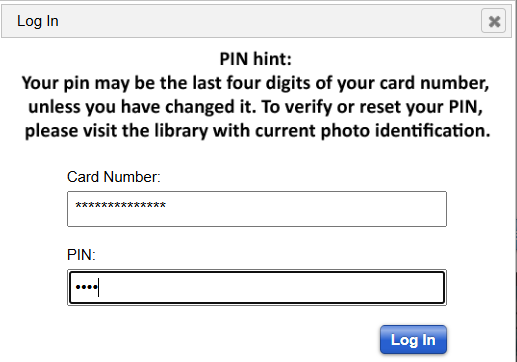
3. Enter your library card number and PIN, then click “Log in.”
4. Click on “My Lists” in the menu bar.

5. Choose the list you want to save from the left column.
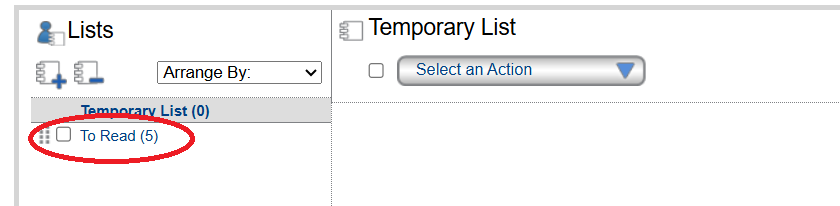
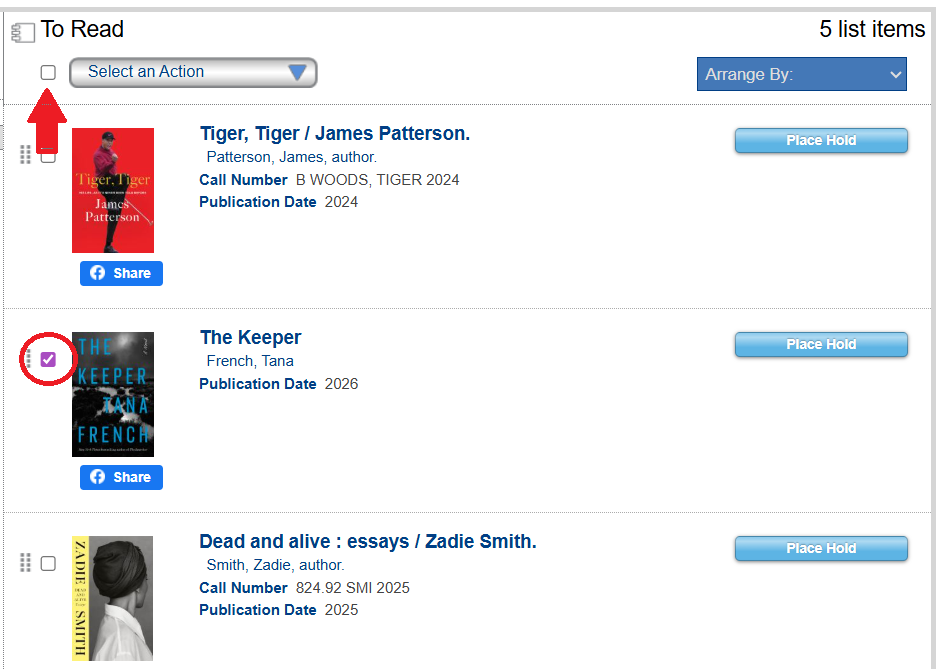
6. Choose the titles you want to save by ticking the box next to the title. If you want to save the entire list, tick the box next to the “Select an Action” dropdown menu.
7. Click on the down arrow in the “Select an Action” dropdown menu, then choose either “Email” or “Print.”
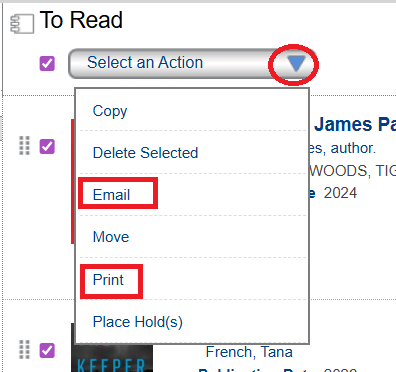
8. Save the titles to add to your lists when the new catalog goes live, or copy these titles to a site, like Beanstack, Goodreads, or LibraryThing.
Saving Reading History
If you have checkout history enabled, it will not be carried over to the new catalog and will also need to be saved. Here is what you will need to do to save your titles.
1. Go to the Library Catalog
2. Click the “Log In” link in the menu bar at the top of the screen.
3. Enter your library card number and PIN, then click “Log in.”
4. Click the “My Account” link in the menu bar.
5. Go to the Checkouts tab, and click on Checkout History.
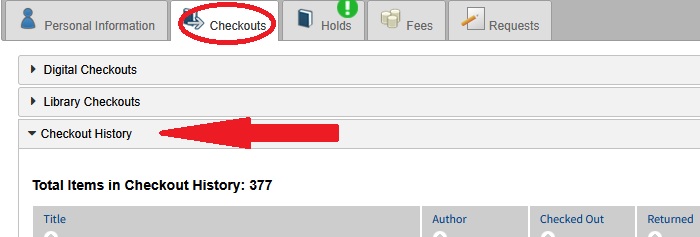
6. The titles don’t export as cleanly as Lists, but they can be printed by choosing Print in your browser’s menu. They can also be copied and saved as a text document into the app of your choice (notepad, wordpad, Word).
7. Items that are checked out with the new catalog will be able to be tracked after May 6.